

11 Days Until Disaster: Why Won’t Your IT Team Notice That a Ransomware Attack Is Underway?
Most managers and business owners imagine a ransomware attack as a sudden bolt from the blue. One click, a flash on the screen, and blood-red text announcing that their files have been locked.
Reality is far more insidious. A ransomware attack is not an incident – it is a multi-stage process that typically lasts from several days to several weeks. It is a methodical operation in which data encryption is merely the final chord of a long-running campaign.
The good news? This period is your “window of opportunity.” Attackers leave traces at every stage. The bad news? Traditional IT teams, busy with day-to-day user support, rarely have the tools or time to spot these traces. Let’s take a look at what these 11 days—which could determine your company’s survival—look like.
Day 0: An email that didn't raise any suspicions
It is Monday, 9:14 AM. Anna from the accounting department opens her inbox. Among dozens of messages, she finds one titled: “Urgent: invoice for verification – payment due today”. The sender looks familiar; the domain differs by only one letter from the address of a regular supplier.
Anna opens the attached Excel file. The program prompts her to “Enable Content” in order to display the table correctly. Anna clicks the button. It’s a routine task she’s performed hundreds of times.
What happened under the hood?
Należy zauważyć, że at the moment of clicking, a hidden macro immediately executed a PowerShell script, which constituted the initial attack vector. This, in turn, downloaded a small application from the web – a so-called loader. In practice, this malware installed itself in a temporary folder and established a silent connection with the C2 (Command & Control) server belonging to the hackers.
Importantly, Anna's computer is still functioning normally, which effectively lulls the user into a false sense of security. As a result, Anna calmly sips her coffee, completely unaware that she has just opened the digital doors to intruders. It is worth emphasizing that at this stage, only advanced threat analysis and real-time process monitoring could detect this anomaly before the hackers begin further infiltration.
Where would the SOC detect an attack?
It should be emphasized, however, that professional EDR/XDR monitoring systems would immediately detect such an anomaly. In practice, security algorithms would classify suspicious PowerShell process calls initiated by Excel as high-risk activity. Furthermore, these systems would automatically block any attempt to connect to a server with a poor reputation. As a result, properly configured tools would nip this attack in the bud before hackers could download the loader and take control of the workstation.
Days 1–3: Quiet reconnaissance
The hackers aren't in a hurry. For the next three days, the loader on Anna's computer serves as their foothold. The attackers gather information:
- What software is installed on the network?
- What are Anna's permissions?
- Where are the servers containing the most important data located?
This is a phase of recognition. The traffic generated by hackers is minimal so as not to trigger alerts from basic antivirus programs.
Days 4–7: Receiving the Keys to the Kingdom
It’s worth noting that before the actual attack takes place, hackers employ a strategy that experts call “double extortion.” This is because the criminals are well aware that you may have working backups. Therefore, they first steal your most sensitive data so that they can then blackmail the company by threatening to make it public.
In practice, attackers methodically copy customer databases, confidential contracts, and critical financial data. Importantly, this information is transferred in small batches—most often at night—using standard HTTPS ports. As a result, this process blends in almost perfectly with ordinary internet traffic, making it virtually invisible to standard security measures.
Day 11: The Zero Hour and Sunday Morning
It’s Sunday, 3:00 a.m. It’s the perfect moment—no one is looking at their screens, and the IT team is resting up for the new week. The attackers launch the encryption process.
Within a few hours:
- The main databases and ERP systems are encrypted.
- Volume Shadow Copies available on the network are being deleted.
- A ransom note appears on all computer screens: 50 BTC.
On Monday morning, employees find their workstations locked. The company comes to a standstill. Production halts, the logistics team doesn’t know where to send the goods, and management learns from the media that a sample of their data has just been leaked to the dark web.
Summary: Could this have been avoided?
The table below shows that the hackers gave us at least a few chances to prevent this disaster:
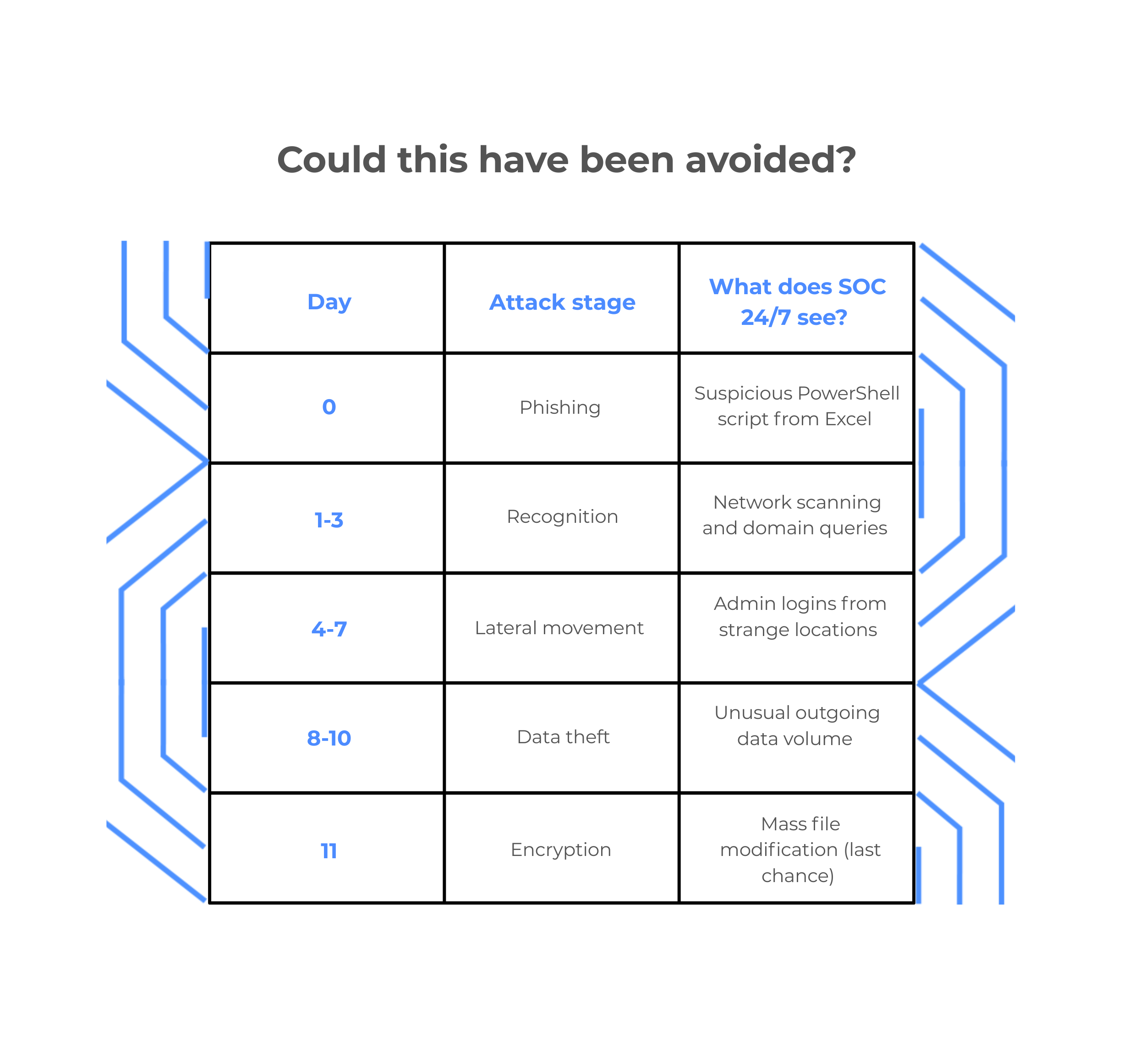
How is SOC changing the game?
The Security Operations Center (SOC) isn't just there to block emails. Its job is to detect anomalies in real time.
If the company in our story had had SOC support, the attack would likely have ended on Day 0 with Anna’s computer being isolated and her password being forced to change. The cost? 15 minutes of the accountant’s work. The cost of not having SOC? Hundreds of thousands, and sometimes millions, of zlotys in operational and reputational losses.
Don't wait for the ransom note
A ransomware attack isn’t a matter of “if,” but of “when.” The real difference between a minor incident and the collapse of a company lies in how quickly you realize that an intruder is on your network.